Buyer's guide / Mice
Best mouse (2026)
Six picks across gaming, productivity and ergonomics -- a featherweight esports flagship, an innovative haptic-click mouse, the budget standout, the productivity king, a vertical ergonomic mouse, and a small-hands all-rounder -- ranked from published specs and independent testing.
By Evan Cole · Last updated July 13, 2026
The mouse is where aim and cursor precision actually happen, and in 2026 the two ends of the market have pulled further apart. Gaming mice keep getting lighter and faster — sub-50-gram shells with 8000 Hz wireless — while productivity mice go the other way, adding haptics, quiet clicks and multi- device switching. This guide covers both, plus the ergonomic option for anyone whose wrist is the real bottleneck.
This guide is a research-led synthesis of manufacturer specifications and independent testing -- principally RTINGS, linked per pick -- plus long-term owner consensus. Every figure below traces to a cited source; where a manufacturer doesn't publish a spec we flag it rather than guess. Produced with AI assistance as part of our research workflow; product photos are courtesy of each manufacturer.
The verdict, at a glance
Best gaming overall
A genuine esports flagship — 48.9 g with 8000 Hz wireless and one of the most accurate sensors RTINGS has tested.
Best premium / most innovative
The most innovative mouse here — HITS click swaps physical switches for adjustable actuation and Rapid Trigger, mouse-side.
Best budget
A near-perfect budget wireless mouse — click latency RTINGS rates below some wired options, plus 250-hour AA life.
Best for productivity
The productivity mouse to beat — superb build, dual scroll wheels, very quiet clicks and a new haptic side panel.
Best ergonomic / vertical
A 57° vertical 'handshake' posture that cuts wrist pronation, sized for small-to-medium hands.
Best for smaller hands / aesthetic
A capable 85 g wireless gaming mouse contoured for smaller hands, styled to match Logitech's Aurora setup.
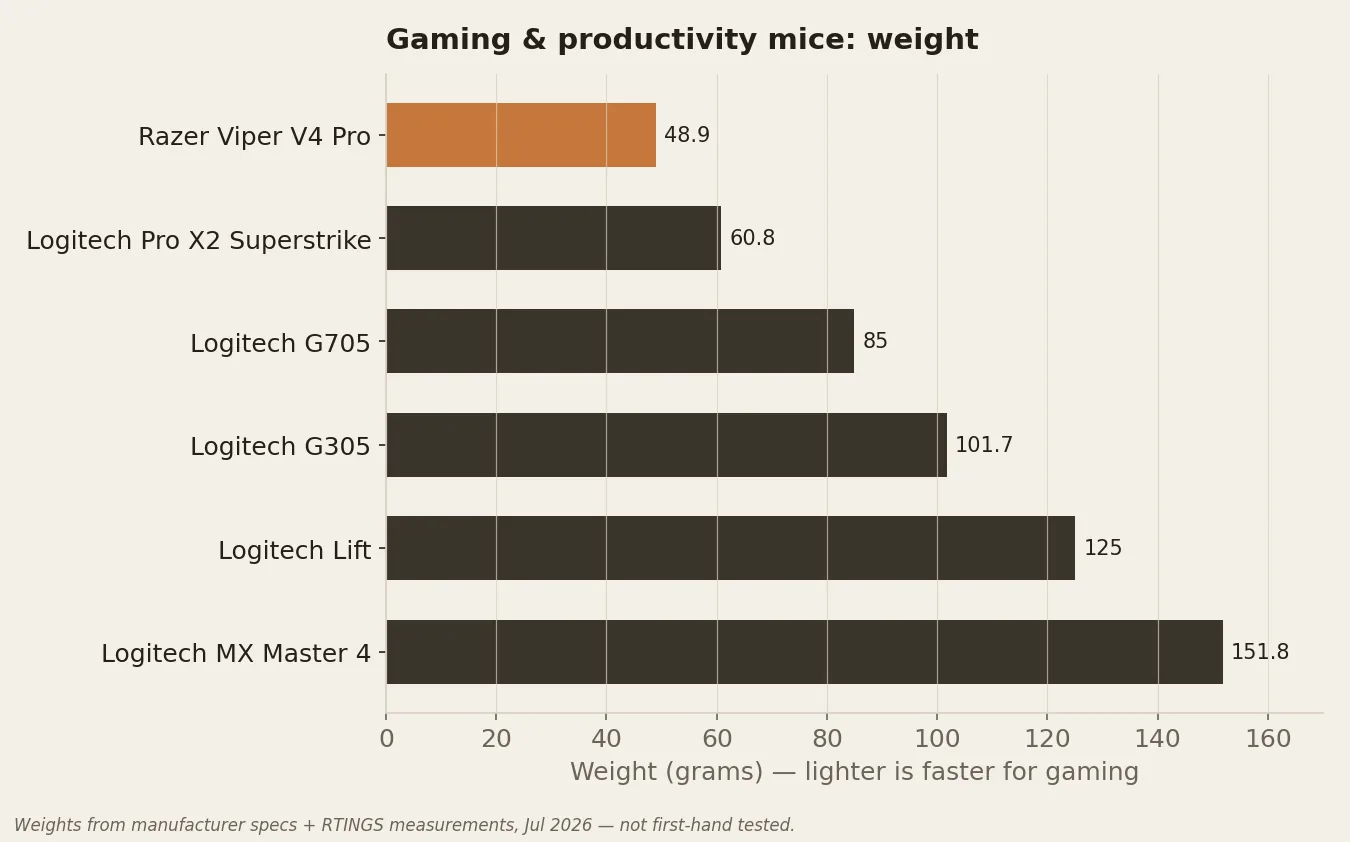
At a glance: specs compared
| Mouse | Weight | Max DPI | Connectivity | Polling | Price |
|---|---|---|---|---|---|
| Razer Viper V4 Pro | 48.9 g | Focus Pro 50K Gen-3 — 50,000 DPI | HyperSpeed 2.4GHz + wired (no Bluetooth) | 8000 Hz | ~$160 |
| Logitech G Pro X2 Superstrike | 60.8 g | HERO 2 — 44,000 DPI | LIGHTSPEED 2.4GHz (no Bluetooth) | 8000 Hz | ~$180 |
| Logitech G305 Lightspeed | 101.7 g (with AA battery) | HERO — 12,000 DPI | LIGHTSPEED 2.4GHz; 250-hour single AA | 1000 Hz (widely reported; Logitech doesn't restate it on the product page) | ~$40–60 |
| Logitech MX Master 4 | 151.8 g | 8,000 DPI (darkfield, tracks on glass) | USB-C Logi Bolt + Bluetooth (3 devices) | 125 Hz (locked) | ~$120 |
| Logitech Lift | 125 g | 400–4,000 DPI (100-DPI steps) | Logi Bolt USB + Bluetooth LE | — | ~$80 |
| Logitech G705 | 85 g | Gaming-grade HERO-class, 8,200 DPI (Logitech doesn't name the exact model) | LIGHTSPEED 2.4GHz + Bluetooth | 1000 Hz | ~$100 |
Compiled from manufacturer specs and RTINGS reviews. Prices are approximate and in USD.
The picks in detail
Best gaming overall
Razer Viper V4 Pro
— VerdictBits editorial score
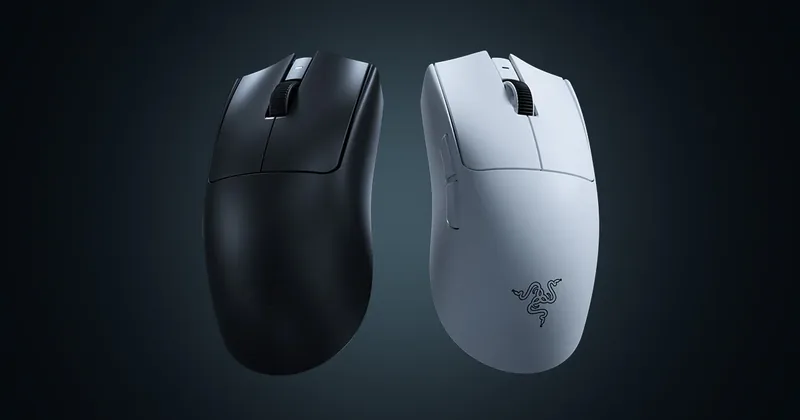
- Sensor / DPI: Focus Pro 50K Gen-3 — 50,000 DPI
- Weight: 48.9 g
- Connectivity: HyperSpeed 2.4GHz + wired (no Bluetooth)
- Polling rate: 8000 Hz
- Buttons: 6 programmable, 1 onboard profile
- Price: ~$160 (approx.)
Reasons to buy
- 48.9 g — genuinely esports-light
- 8000 Hz wireless (HyperSpeed 2.4GHz)
- Focus Pro 50K Gen-3 — RTINGS-rated most accurate
- 50,000 DPI ceiling
Reasons to avoid
- No Bluetooth
- Only one onboard profile
- Priced at the top of the mainstream range (~$160)
Why it's here: RTINGS rates the Focus Pro 50K Gen-3 as one of the most accurate sensors they've tested, and at 48.9 g with 8000 Hz wireless it's a genuine esports flagship.
The catch: No Bluetooth, only one onboard profile, and it's priced at the top of the mainstream range.
Sources: manufacturer specs · RTINGS review.
Best premium / most innovative
Logitech G Pro X2 Superstrike
— VerdictBits editorial score
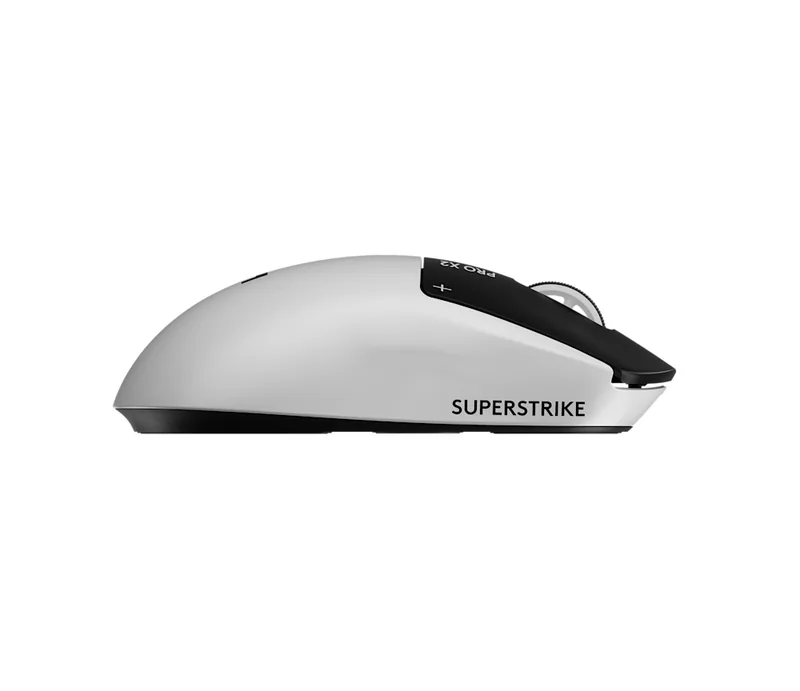
- Sensor / DPI: HERO 2 — 44,000 DPI
- Weight: 60.8 g
- Connectivity: LIGHTSPEED 2.4GHz (no Bluetooth)
- Polling rate: 8000 Hz
- Buttons: Programmable (Logitech doesn't publish the exact count)
- Price: ~$180 (approx.)
Reasons to buy
- HITS click system — programmable actuation + haptics
- Adjustable actuation plus Rapid Trigger
- 8000 Hz wireless (LIGHTSPEED)
- HERO 2 sensor, 44,000 DPI
Reasons to avoid
- Expensive (~$180)
- RTINGS: not a dramatic leap for most players
- UHMWPE feet glide muddier than PTFE rivals
- No Bluetooth
Why it's here: Its HITS click system swaps physical switches for programmable actuation and haptic motors, adding adjustable actuation and Rapid Trigger — mouse-side, the same idea that transformed keyboards.
The catch: RTINGS cautions it's expensive and 'doesn't represent a dramatic performance leap for most players'; the UHMWPE feet glide a little muddier than PTFE rivals, and there's no Bluetooth.
Sources: manufacturer specs · RTINGS review.
Best budget
Logitech G305 Lightspeed
— VerdictBits editorial score
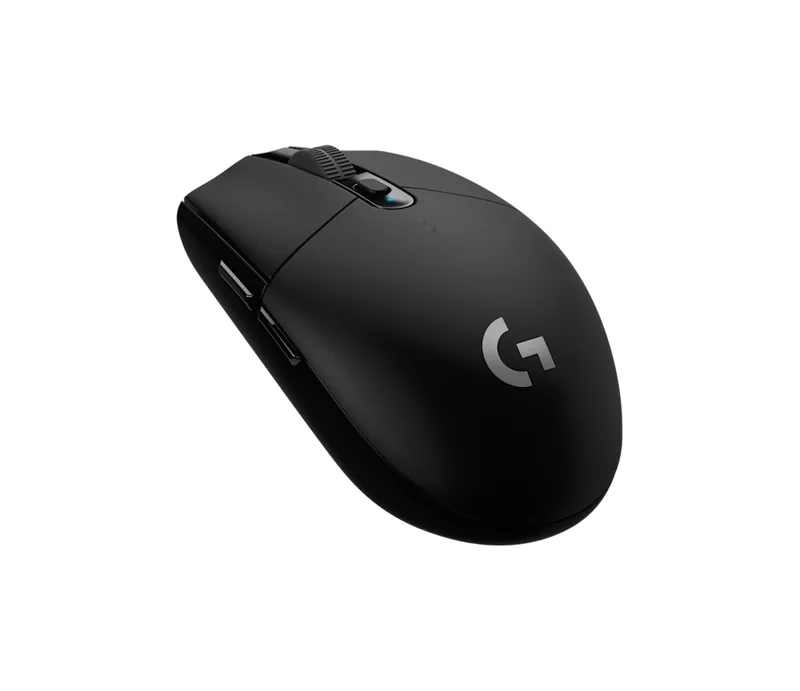
- Sensor / DPI: HERO — 12,000 DPI
- Weight: 101.7 g (with AA battery)
- Connectivity: LIGHTSPEED 2.4GHz; 250-hour single AA
- Polling rate: 1000 Hz (widely reported; Logitech doesn't restate it on the product page)
- Buttons: 6
- Price: ~$40–60 (approx.)
Reasons to buy
- Click latency lower than some wired rivals (RTINGS)
- 250-hour single AA battery life
- LIGHTSPEED 2.4GHz wireless
- Cheapest gaming pick (~$40–60)
Reasons to avoid
- 101.7 g — heaviest gaming pick here
- Older 12,000-DPI HERO sensor
- 1000 Hz polling (trails 8k flagships)
Why it's here: RTINGS notes its click latency is excellent — 'even lower than some wired options at a similar price' — and 250-hour AA battery life makes it a near-perfect budget wireless mouse.
The catch: At 101.7 g it's the heaviest of the gaming picks here, and it uses the older 12,000-DPI HERO sensor.
Sources: manufacturer specs · RTINGS review.
Best for productivity
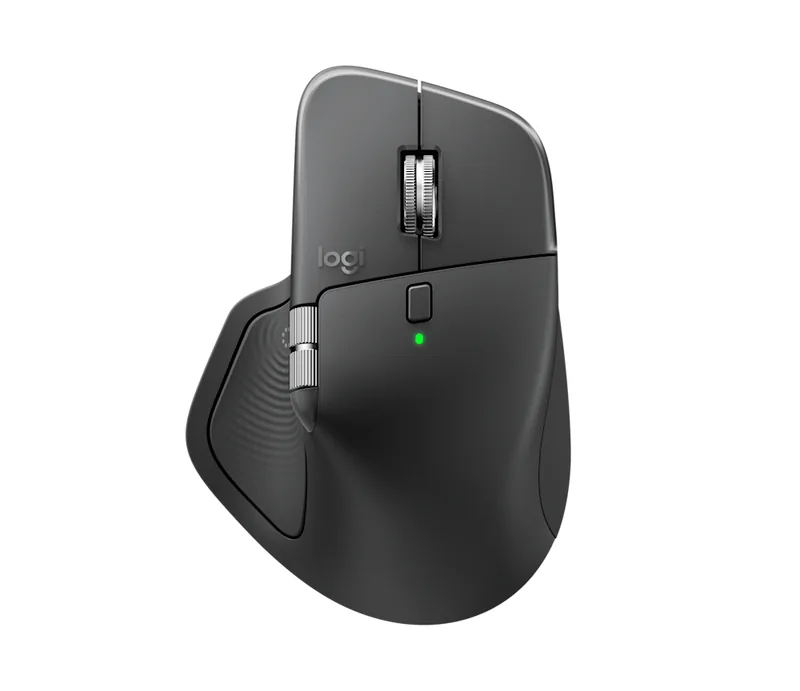
Logitech MX Master 4
— VerdictBits editorial score
- Sensor / DPI: 8,000 DPI (darkfield, tracks on glass)
- Weight: 151.8 g
- Connectivity: USB-C Logi Bolt + Bluetooth (3 devices)
- Polling rate: 125 Hz (locked)
- Buttons: 8 (incl. haptic side panel, gesture, thumb wheel)
- Price: ~$120 (approx.)
Reasons to buy
- RTINGS' top work pick — superb build quality
- Dual scroll wheels + very quiet clicks
- New haptic side panel
- Multi-device Bluetooth (3); tracks on glass
Reasons to avoid
- 125 Hz polling locked — slight lag on 90 Hz+ monitors
- Gestures/haptics need Logi Options+
- No onboard memory
- Heavy at 151.8 g (by design)
Why it's here: RTINGS' pick for work: superb build quality, dual scroll wheels, very quiet clicks, and a new haptic side panel. The productivity mouse to beat.
The catch: 125 Hz polling is locked (you may see slight cursor lag on 90 Hz+ monitors), gestures/haptics need Logi Options+, and there's no onboard memory. Heavy at 151.8 g — by design, not a flaw.
Sources: manufacturer specs · RTINGS review.
Best ergonomic / vertical
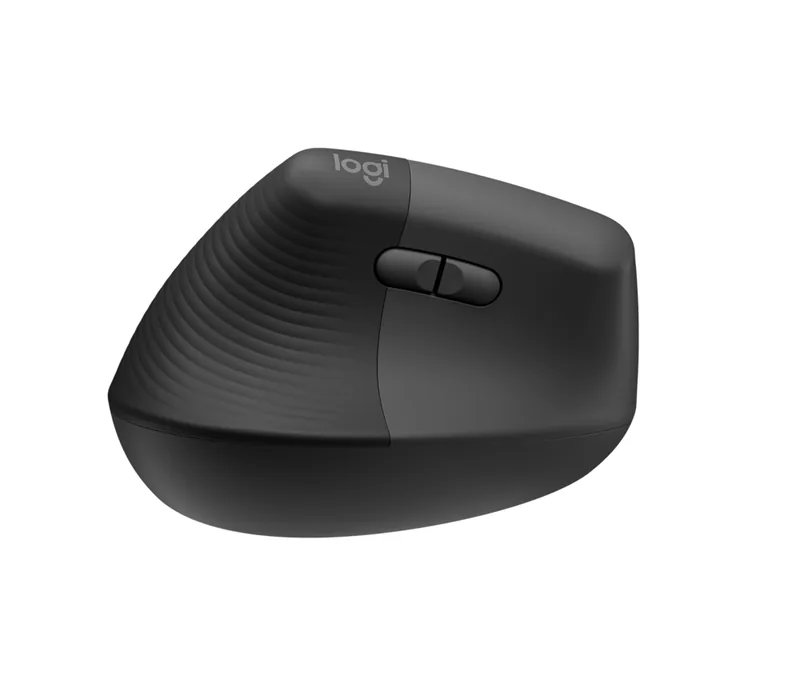
Logitech Lift
— VerdictBits editorial score
- Sensor / DPI: 400–4,000 DPI (100-DPI steps)
- Weight: 125 g
- Connectivity: Logi Bolt USB + Bluetooth LE
- Polling rate: —
- Buttons: 6 (customisable)
- Price: ~$80 (approx.)
Reasons to buy
- 57° vertical posture reduces wrist pronation
- Compact shell suits small-to-medium hands
- Left-handed version available
- 24-month AA; Bolt USB + Bluetooth LE
Reasons to avoid
- RTINGS: not as solidly built as pricier MX Master
- 4,000-DPI cap is low for fast dual-monitor work
- No published polling rate
Why it's here: A 57° vertical 'handshake' posture that reduces wrist pronation, in a compact shell that suits small-to-medium hands — with a left-handed version and a 24-month AA battery.
The catch: RTINGS notes it 'doesn't feel as solidly built as the pricier MX Master series,' and the capped 4,000 DPI is low for fast dual-monitor work (fine for ergonomics-first users).
Sources: manufacturer specs · RTINGS review.
Best for smaller hands / aesthetic
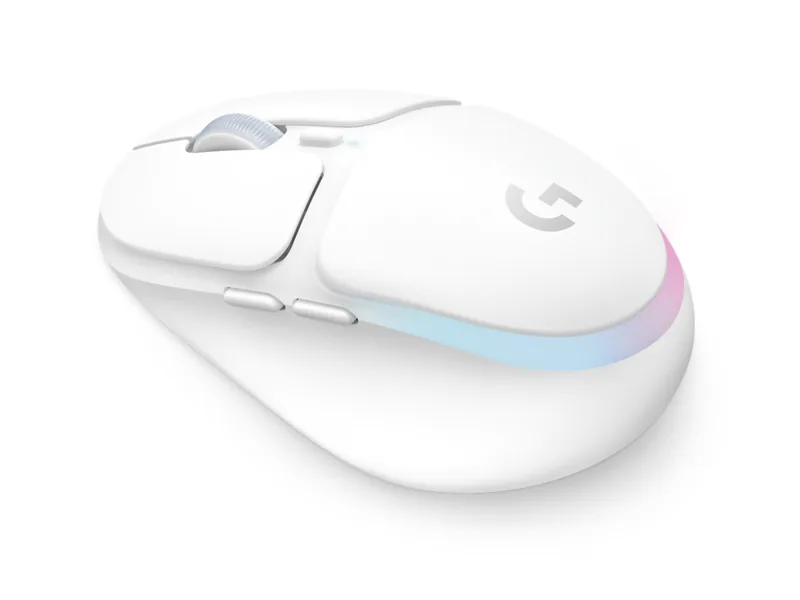
Logitech G705
— VerdictBits editorial score
- Sensor / DPI: Gaming-grade HERO-class, 8,200 DPI (Logitech doesn't name the exact model)
- Weight: 85 g
- Connectivity: LIGHTSPEED 2.4GHz + Bluetooth
- Polling rate: 1000 Hz
- Buttons: 6
- Price: ~$100 (approx.)
Reasons to buy
- 85 g wireless, contoured for smaller hands
- LIGHTSYNC RGB + White Mist / Pink Dawn
- Part of Aurora collection — coordinated setup
- LIGHTSPEED 2.4GHz + Bluetooth
Reasons to avoid
- Logitech never names the exact sensor
- 1000 Hz polling trails 8000 Hz flagships
- Often out of stock
Why it's here: A genuinely capable 85 g wireless gaming mouse contoured for smaller hands, with LIGHTSYNC RGB and White Mist / Pink Dawn colourways — part of Logitech's Aurora collection, so it matches a coordinated setup.
The catch: Logitech never names the exact sensor, 1000 Hz polling trails the 8000 Hz esports flagships, and it's often out of stock.
Sources: manufacturer specs · RTINGS review.
Worth pairing (honest complementary picks)
These are category recommendations, not specific SKUs — genuinely useful alongside any of the mice above:
- A large cloth or hybrid mousepad — a big, low-friction surface is the single biggest upgrade for a light gaming mouse. Browse on Amazon →
- A mouse bungee — only for the wired-capable gaming picks; it tames cable drag if you play wired. Browse on Amazon →
- PTFE or glass mouse skates — replacement feet that make a gaming mouse glide noticeably smoother (check your exact model). Browse on Amazon →
- A gel wrist rest — pairs well with the heavier productivity picks (MX Master 4) and the vertical Lift. Browse on Amazon →
Compare retailers: our picks link to Amazon — it's also worth cross-checking current mouse prices on Newegg →.
Frequently asked questions
What is the best gaming mouse in 2026?
Based on RTINGS' testing, the Razer Viper V4 Pro is the strongest all-round gaming pick: at 48.9 g with 8000 Hz wireless and the Focus Pro 50K Gen-3 sensor (which RTINGS calls one of the most accurate they've tested), it's a true esports flagship. If you want most of that for far less, the Logitech G305 Lightspeed is the budget standout, with click latency RTINGS rates below some wired mice. This is a synthesis of published specs and independent reviews.
Does mouse weight actually matter for gaming?
For fast games, yes — a lighter mouse is easier to flick and lift, and reduces fatigue over long sessions, which is why esports mice have dropped toward and below 50 g (the Viper V4 Pro is 48.9 g). But lighter isn't automatically better: some players prefer a little heft for control in slower, precision-aiming games, and productivity users don't benefit from a featherweight at all. Weight is a preference within a sensible range, not a scoreboard — a heavier mouse with a great sensor and shape can still out-perform a lighter one that fits your hand poorly.
Wireless or wired for a gaming mouse?
Modern 2.4GHz wireless (Logitech LIGHTSPEED, Razer HyperSpeed) is now competition-grade — the latency is effectively indistinguishable from wired for almost everyone, and you lose the cable drag. That's why the Viper V4 Pro and G305 are wireless. Bluetooth is a different thing: it adds latency and is meant for productivity and multi-device use (the MX Master 4 and Lift use it), not twitch gaming. Rule of thumb: 2.4GHz dongle for gaming, Bluetooth for work.
How much DPI do I actually need?
Far less than the box advertises. Most players use somewhere between 400 and 1600 DPI and adjust in-game sensitivity to taste; a 50,000-DPI ceiling (Viper V4 Pro) or 44,000 (Superstrike) is headroom, not a requirement. High DPI numbers are largely a marketing spec — sensor accuracy, consistency and your chosen DPI matter more than the maximum. Productivity users on high-resolution or multi-monitor setups benefit from a bit more (the MX Master 4's 8,000 DPI is plenty), while the Lift's 4,000-DPI cap is fine for ergonomics-first use.
What's the difference between a gaming mouse and a productivity mouse?
A gaming mouse prioritises low weight, a fast sensor, high polling (up to 8000 Hz) and low-latency wireless, usually with a simple button layout — the Viper V4 Pro and G305 are built this way. A productivity mouse prioritises comfort, quiet clicks, extra buttons, a precise scroll wheel (often free-spinning), multi-device Bluetooth switching and tracking on glass — the MX Master 4 is the archetype, and the Lift adds a vertical, wrist-friendly posture. If you do both, many people keep a light gaming mouse and a separate ergonomic work mouse rather than compromising with one.
Related guides
- Best gaming keyboards of 2026 — the other half of your battlestation.
- Best keyboards for programming of 2026 — for the productivity desk.
- Keyboard switches compared 2026 — sortable switch data.
- Best standing desks of 2026 — what it all sits on.
Affiliate disclosure: some links above are affiliate links (Amazon
Associates, tag setupquarterly-20) — if you buy through
them, VerdictBits may earn a commission at no extra cost to you. We do not
accept payment for reviews, and commissions never influence a pick. See our
disclosure and methodology.